|
SplashID > Standalone > Download | Purchase | Release Notes | User Guide | FAQ
Release Notes for SplashID Desktop
Please find the latest versions of SplashID Safe at www.
splashid.com
July 26, 2012 - Version 6.2 for Windows & Mac
- • Issues synchronizing between multiple devices and desktops resolved
- • Windows: Fixed data corruption on sync with older desktop version
- • Mac: Safari Autofill enhanced to work with more sites, support for 5.1.7 (Note: Safari 6 is not
supported at this time, but we're working on it)
- • Mac: Gatekeeper certification so SplashID will run freely on Mountain Lion
- • Numerous other minor bug fixes
* This update is FREE and REQUIRED to sync with version 6.2 update on
mobile devices.
April 13, 2012 - Version 6.1 for Windows & Mac
- • Security enhancement and minor bug fixes
- • Browser plugin support for Safari 5.1.5
* This update is FREE and REQUIRED to sync with version 6.1 update on
mobile devices.
August 4, 2011 - Version 6.0.4 for Windows
- • Added the ability to activate through
proxy connection
- • Added the shortcut key for Ctrl + N to add a new record
- • Removed the Bonjour error message on launch
- • Fixed an issue with exporting multiple records
- • Various other bug fixes
August 2, 2011 - Version 6.0.4 for Mac
- • Safari plugin updated to be compatible with Safari 5.1 on both Lion
and Snow Leopard (Note: Web Autofill is failing in Safari 5.1. This
is being worked on and a fix will be released as soon as possible.)
- • Fixed a bug related to uppercase letters in username
- • Fixed a bug causing a password error on login on Mac OS 10.5
- • Fixed a bug where Switzerland was not allowed in the credit card
purchase details
- • Fixed a bug where Mac OS 10.5 users could not export to CSV
June 24, 2011 - Version 6.0.2 for Windows
- • Resolved BlackBerry USB sync issues
May 12, 2011 - Version 6.0.2 for Mac
- • Fixed a problem with the Safari plugin installation that was causing
a crash for some users
May 12, 2011 - Version 6.0.1 for Windows
- • Fixed a problem where deleted records were not synchronizing correctly
between mutliple mobile devices
May 5, 2011 - Version 6.0.1 for Mac
- • Minor bug fixes and performance enhancement
April 28, 2011 - Version 6.0 for Windows & Mac
NOTE THIS IS AN OPTIONAL PAID UPGRADE. IT COSTS 9.95
TO UPGRADE.
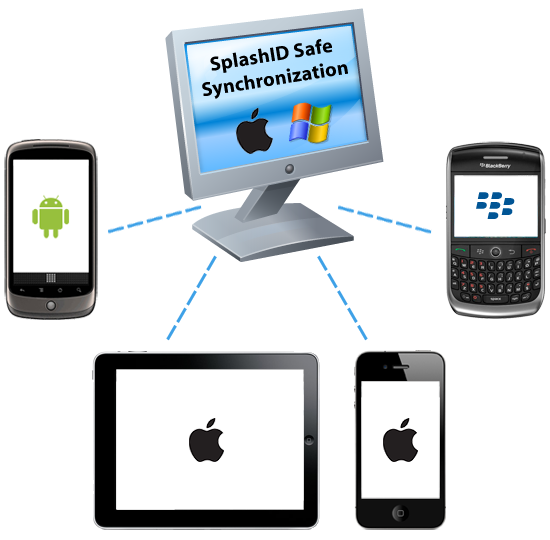
- • Unified Desktop. - Unified support for synching a single
desktop database with multiple devices (iPhone, iPad, Android and BlackBerry).
This is done using an email ID for your username instead of the device
name. This way you sync all devices to the same desktop user identified
by the email address.
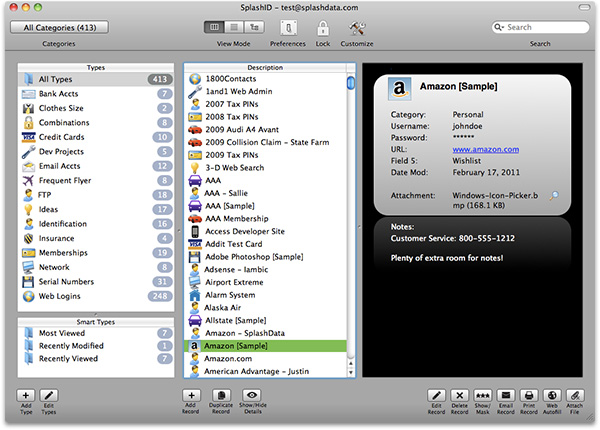
- • Redesigned and upgraded user interface. Includes new
button style with labels, familiar top toolbar that is highly customizable,
snazzy new detail pane, bigger edit dialog with simplified buttons.
- • Pattern login. If you are a fan of this feature on
the iPhone application, you can now use the same method to login to the
desktop.

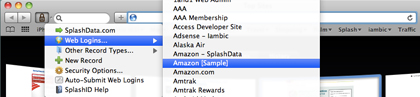
- • Safari plugin now supports Other Record Types. So you
can find and copy credit card numbers on the fly when using the browser.
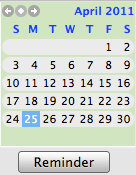
- • Reminder feature for individual records. To use it,
double click a record to edit, then click the Reminder button. Choose
the date in the future you want to be reminded to update the record.
Save. You'll get the reminder when you launch on that day. Great for
passwords that you need to change regularly or credit cards expiration
dates.
- • Hover then click to copy field data in the Detail
Pane

- • All Types listing now appears in the Type panel. Check
this updated Panel View out if you are a steadfast fan of the list view.
- • Sound at unlock. *Click!*
- • Auto-email-backup system.
Go to Prefs > Data/Backup
to try it out.
- • Tip of the day on launch.
- • Enhanced search. Searches inside of record data
strings, not just "starts with."
- • Enhanced send VID tool. Fewer steps, more intuitive,
no need for email client.
- • List View: Right click column heading to customize
Show Columns.
- • Edit Types button under Types panel
- • Send feedback option in Help menu of SplashID Desktop
SplashID 5.3.3 - June 9, 2010
- • Mac OS Desktop - Plugin updated to support Safari 5
SplashID 5.3.2 - May 24, 2010
- • Mac OS Desktop:
- • Made an improvement to the Safari plugin installer
- • Changed database sync so that sync can begin automatically if
the passwords are the same on the synchronizing databases
- • Fixed a bug with printing a record
- • Fixed a crashing issue when synchronizing in Tree View
- • Windows Desktop:
- • Changed database sync so that sync can begin automatically
if the passwords are the same on the synchronizing databases
SplashID 5.3 - April 20, 2010
- • Search history available when you click the drop down arrow in the
Search box
- • Reset SplashID feature - useful for troubleshooting sync issues
or when you are leaving a computer behind and want to clear off SplashID
data
- • Results dialog tells lists records after import
- • Various bug fixes
SplashID 5.2 - Free Update from version 5.x - December 8, 2009
- • Mac OS:
- • New installer that installs the Safari plugin along with SplashID
desktop
- • Snow Leopard support
- • eWallet import improved with instructions
- • 1Password import tool added
- • Keychain import tool added
- • Safari plugin support on Snow Leopard (Note: You need to run
Safari in 32-bit mode at this time to use the SplashID plugin.
Reinstall the plugin from the File menu in the SplashID desktop)
- • Ability to set longer timeout periods in the Safari plugin
- • Various bug fixes
- • Windows:
- • New installer that installs the Safari plugin along with SplashID
desktop
- • eWallet Import improved with instructions
- • 1Password Import
- • Support for Windows 7
- • Browser plugin support for Internet Explorer
SplashID 5.1 - Free Update from version 5.0 - August 21, 2009
- • Security Enhancement - 10 failed password attempts now erases data
immediately
- • (Mac OS) Support for accented characters in Date Modified field
- • (Mac OS) Browser Plugin Support for Safari 4.0.3
- • (Windows) Browser Plugin Support for Internet Explorer 8
SplashID 5.0 - Major Upgrade - July 22, 2009
Note: This is an optional paid upgrade from previous versions ($9.95).
Purchase the upgrade from the registration dialog on launch.
- • Security Enhancements:
- • AES. This US government approved encryption standard has been
added on top of the already powerful Blowfish algorithm.
- • Password Hint Question. Password hints can be a little too easy
sometimes, so first you'll have to answer one of the security questions
of your choosing before the hint is revealed.
- • Password Strength Indicator. Added to the Set Password dialog
and the Password Generator. Don't feel bad if you like short passwords.
We all do.
- • Clear Clipboard on Exit. This default option is found in the
Options dialog. It plainly makes sense.
- • Browser Plug-In. SplashID in your browser! A search box and Web Login
picker is added to Safari/Internet Explorer if you install it. This
replicates the web autofill functionality from the SplashID desktop,
but as an installed plugin for Internet Explorer (Windows) and Safari
(Mac). Sorry, but Firefox and other browsers will not be supported
at this time. To install the plugin, go to File > Plugin for Safari/Internet
Explorer > Install.
- • Install to Removable Device. Now you can take SplashID on a thumb
drive (or whatever) anywhere you go. Copies the application and database
files to <Removable Disk>/SplashID folder.
- • Add Attachments. A new field has been added to the database so you
can add a file (up to 1mb) to the record for association and safe keeping.
- • Add Icons. Just click Add Icons in the Icon Picker, so your record
and type icons can be whatever you like. You will also notice we updated
some of the old rickety icons.
- • Smart Types. In the lower left of the Detail View, you will find
3 Smart Types containing the latest 10: Most Viewed, Recently Modified,
and Recently Viewed. These help you get to your most popular records
faster.
- • Scrollable Detail Pane. If your Notes are longer than the provided
space in the Detail Pane, you will have a scroll bar so you can view
the full notes without having to open the Edit dialog.
- • Resizable Edit Dialog. You can now vertically resize the Edit Dialog
so you can get more out of that notes field.
- • Better Keyboard Support. You can tab between windows and UI elements
better now to avoid that annoying mouse click.
- • Enhanced Database Sync Logic. When using the database sync feature
introduced in version 4, you should no longer have lost or duplicated
records.
- • Drag and Drop Records into Types. Need to change the type assignment
for a record? Select it, then click it, the drag it into the destination
type (Panel View).
- • DeDupe Tool. Scans the database for records containing the same data
and offers to delete them. Found in the File menu.
- • Event Viewer. Logs your activity in SplashID so we can provide you
with the Smart Types. This may also be useful in technical support
scenarios. Found in the View menu. The log file only contains record
names - none of the other fields. You can file this file:
- • Mac OS: ~/Documents/SplashID/SplashIDLogFile.plist
- • Windows: C:\Users\<user>\Documents\SplashData\SplashID\Preferences\EventsLog.xml
- • Better Print support. For record list, text is wrapped, and there
is an option to print notes. For individual records, nice new layout.
- • Minimize to System Tray. On Windows, you have the option of minimizing
to the System Tray (bottom right) instead of the Task Bar. To enable
this, go to Options > Minimize Options.
- • Sequential Backup System. Auto backup now saves multiple backup files
so you don't lose your data if you have a database meltdown, then quit
SplashID and overwrite the backup file on exit (as in previous versions).
Now backups have sequential filenames, Backup 0, Backup 1, Backup 2,
Backup 3, etc. When Backup 9 is reached, the next save replaces Backup
0, so you don't spiral into infinitely diminishing hard disk space.
SplashID 4.15 - June 1, 2008
- • Windows: Fixed an auto-lock bug in List View
SplashID 4.14 - April 11, 2008
- • Windows:
- • Fixed the crasher on launch in Panel View
- • Fixed export version 3.x vID export so Unfiled types can be exported
as well
- • Mac OS:
- • After export, email dialog defaults to "No."
SplashID 4.12 (Mac OS) - April 3, 2008
- • Window position, Category and Type filter selection, and column width
settings remembered on exit
- • Masked data is copied correctly using clipboard button in Detail
Pane
- • Missing records and/or Types on import fixed
- • Restored the ability to apply Show Columns settings to only the currently
displayed Type
- • Restored implied secondary column sorting
SplashID 4.11 (Mac OS) - March 25, 2008
- • Major upgrade - upgrade
from previous versions for $9.95
- • New views - Panel View and Tree View
- • Enhanced security - auto lock-out after 10 failed attempts and password
hint option
- • Web Auto-Fill - one click to open a website on the desktop and login
automatically
- • Synchronize multiple SplashID databases (with other version 4 database
files only)
- • Enhanced Lookup feature instantly displays relevant results as you
type
- • Email securely encrypted SplashID files to other users
- • Add additional users
- • Change the database and auto-backup file locations
- • Toolbars give you button features where they are needed the most
- • Updated icon set with enhanced high resolution graphics
- • Fully Leopard compatible
- • Universal Binary
SplashID 4.12 (Windows only) - February 26, 2008
- • Sorting under tree branches is fixed
- • Search options added to the Options dialog - now you can select to
search in Field 1 or All fields
- • Default backup path corrected to My Documents\SplashData\SplashID\Backup\
- • Custom icons displayed in Tree and List Views
- • Export version 3.x vID files now - compatible with Series 60 application
- • Other bug fixes
SplashID 4.02 (Windows only) - July 13, 2007
- • Major upgrade - upgrade from previous versions for $9.95
- • New views - Panel View and Tree View
- • Enhanced security - auto lock-out after 10 failed attempts and
password hint option
- • Web Auto-Fill - one click to open a website on the desktop and login
automatically
- • Synchronize multiple SplashID databases (with other version 4 database
files only)
- • Enhanced Lookup feature instantly displays relevant results as you
type
- • Email securely encrypted SplashID files to other users
- • Add additional users
- • Change the database and auto-backup file locations
- • Toolbars give you button features where they are needed the most
- • Updated icon set with enhanced high resolution graphics
- • Fully Vista compatible
SplashID 3.4 - July 9, 2006
- • Evaluation version for Windows released - unlimited trial period
with maximum of 25 records
SplashID 3.32 - July 14, 2005
- • Desktop database can now be saved to a custom location.
- • Desktop/Handheld: Updated the standard icon set.
- • Very minor UI updates, such as improving spacing of translated text
and fixing typographical errors.
- • The Italian version no longer crashes when printing. (Windows)
- • Exported data (vID or CSV) no longer gains an extra linefeed character.
(Windows)
- • Auto-lock no longer crashes print preview. (Windows)
- • Mac version released.
SplashID 3.31 - May 22, 2005
- • Fixed a problem with French DLL incompatibility.
SplashID 3.3 - May 11, 2005
- • First standalone desktop release.
|
